Introduction: When Technology Steps Aside
The best interface is no interface.
That idea, once radical, is now the quiet revolution shaping design in 2025.
As AI grows smarter and sensors more intuitive, the need for visible buttons, icons, and menus is fading. Interfaces are no longer meant to capture your attention — they’re meant to free it.
“We’ve entered the post-interface era,” says Hannah Lee, Lead UX Architect at Google Ambient.
“The goal is seamlessness — tech that dissolves into your life rather than dominating it.”
This is the rise of the Invisible UI — a philosophy where design becomes instinctive, interaction becomes natural, and technology finally feels human.
1. The Shift Toward Invisible Design
1.1 From Visual Overload to Effortless Flow
For years, digital design focused on clarity and control. Apps became feature-heavy, and screens were cluttered with buttons, options, and indicators.
Invisible UI changes that paradigm — replacing interface density with contextual intelligence.
Instead of asking users to press buttons, systems anticipate needs.
Instead of feedback pop-ups, experiences unfold quietly through gesture, presence, or voice.
“Good design used to be seen,” says Mark Nguyen, Head of Product at CalmTech.
“Now, it’s felt.”
2. The Technology That Makes UI Disappear
Invisible UI isn’t science fiction — it’s here, and you’re probably already using it.
2.1 Voice as the Interface
Virtual assistants like ChatGPT Voice, Siri Pro, and Amazon Halo AI handle complex tasks without any visible UI.
Users speak naturally, and AI executes — no menus, no screens.
Example:
A commuter says, “Play my focus playlist until I reach the office,” and their phone, car, and earbuds sync automatically — all without opening a single app.
2.2 Gesture & Spatial Interfaces
Thanks to LiDAR and computer vision, gestures are becoming intuitive inputs.
- Wave to skip songs.
- Nod to answer calls.
- Look at a device to unlock it.
The Apple Vision Pro 2 and Meta Horizon Glasses exemplify this invisible UX: the device understands what you want, not what you tap.
2.3 AI Context Awareness
Invisible UI thrives on contextual prediction.
AI recognizes patterns — location, time, emotion, routine — and tailors responses accordingly.
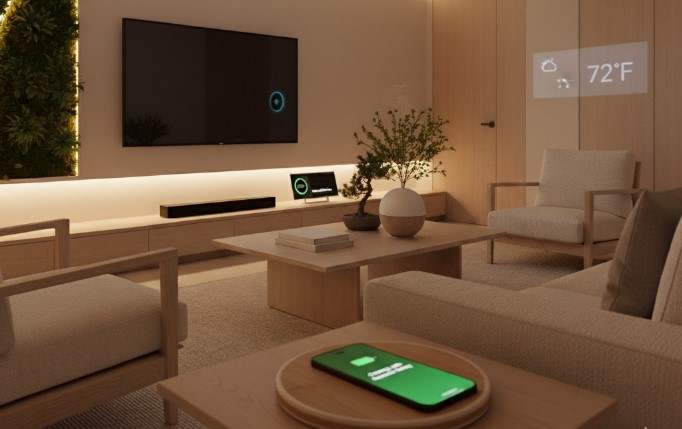
For example, your AI might automatically dim your home lights when it detects you’re relaxing after work.
The interface fades away; intention takes its place.
3. The Human Experience: Life Without Screens
3.1 The Designer Who Let Go
Jon Rivera, a product designer from Barcelona, switched to using an AI-driven minimalist phone for six months.
“It forced me to trust automation,” he says.
“Now, I barely touch the screen. I speak, move, and live — and the tech quietly follows.”
He found that his screen time dropped by 47%, but his productivity rose.
3.2 The Family That Lives in Ambient Harmony
In Tokyo, the Sato family’s smart home runs on invisible interaction: lights, air quality, and sound adjust automatically based on biometric data.
“It feels like the house listens without talking,” says Yuki Sato.
The result: fewer devices, less stress, and a calmer rhythm of living.
3.3 Corporate Example — “Silent Dashboards”
A fintech startup called ClearLedger replaced traditional dashboards with AI status summaries that appear only when needed.
No clutter, no overload — just contextually relevant data.
They saw a 38% productivity boost and higher employee satisfaction.
4. Why Invisible UI Works
Invisible UI succeeds because it aligns with human cognition and emotional minimalism — reducing decision fatigue and interaction friction.
According to a 2025 Stanford study:
- Interfaces that rely on implicit cues (gesture, voice, automation) reduce cognitive load by 42%.
- Users report a 31% higher emotional comfort compared to traditional UI-heavy systems.
It’s not just less interface — it’s less effort.
5. Principles of Invisible UI Design
| Principle | Description | Human Benefit |
|---|---|---|
| Predict, Don’t Ask | Anticipate intent through context | Reduces friction |
| Be There, Not Seen | Provide feedback subtly | Maintains flow |
| Adapt Emotionally | Adjust tone and pace to user state | Builds trust |
| Silence as Signal | Use absence of alerts as communication | Promotes calm |
| Privacy by Design | Sense without storing excess data | Creates safety |
Invisible UI requires trust — and that trust must be earned through transparency, not opacity.
6. The Role of AI in Making the Interface Vanish
Artificial intelligence is the silent engine behind invisible UX.
Through machine learning and sensor fusion, AI can interpret complex human behavior with precision.
Key Enablers:
- Predictive AI: Learns habits and automates tasks.
- Affective Computing: Detects emotional states through voice tone and expression.
- Spatial Computing: Merges digital data with the physical world.
Together, these create systems that feel intuitive — not intrusive.
“When AI understands intent, UI becomes invisible,” explains Dr. Maya Chen, cognitive interaction researcher.
7. Invisible UI in Action: Real-World Examples
- Tesla Autopilot Interface: Provides minimal feedback unless driver attention is required.
- Amazon Halo Band: No screen, only subtle LED and haptic cues.
- Oura Ring Gen 4: Tracks health silently, communicates insights via adaptive summaries.
- Smart Mirrors: Display data only when motion is detected — reducing energy and distraction.
Each of these systems embodies doing more by showing less.
8. The Challenges: When “Invisible” Feels Confusing
Invisible interfaces can also backfire.
When users don’t understand how or why automation happens, anxiety replaces trust.
Common pitfalls include:
- Lack of discoverability (“What triggered that action?”)
- Over-personalization (“Why does it know this about me?”)
- Ambiguity in control (“Can I turn this off?”)
“Invisible shouldn’t mean mysterious,” warns Dr. Samuel Ortiz, UX ethics advisor.
“Users need to feel guided, not ghosted.”
Transparency is the antidote to invisibility’s dark side.
9. Designing for Calm Awareness
Invisible UI doesn’t mean removing feedback — it means delivering it ambiently.
For example:
- Soft lights that glow when a process completes.
- Gentle vibrations instead of sounds.
- Subtle animations to indicate state changes.
These signals maintain awareness without distraction.
It’s the emotional minimalism of interface design — quiet, confident, human.
10. The Future: Beyond Screens and Buttons
By 2030, experts predict most interactions will be post-visual — mediated by AI, sensors, and natural interfaces.
We’ll live in environments that understand us without constant visual mediation.
Think:
- AI companions that sense stress and reduce notifications.
- Adaptive cars that adjust driving tone to your mood.
- Wearables that interpret gestures as silent language.
“Design will be defined not by pixels, but by presence,” says Hannah Lee.
Invisible UI is not the absence of design — it’s the perfection of presence.
Conclusion: The Beauty of Unseen Simplicity
Technology’s next evolution isn’t louder, brighter, or flashier.
It’s quieter, subtler, and almost invisible.
The best systems of the future will disappear into our lives — leaving only the experience, not the interface.
“When you stop noticing the technology,” concludes Mark Nguyen,
“that’s when it’s finally done its job.”